
Uvision 3D Landscape Design Software | Unilock Contractors
EN
Your region
Full Version $579.95 (USD) | Upgrade (from any earlier version) $279.95 (USD)
Uvision® 3D Landscape Design Software

Uvision 3D Landscape Design gives contractors the tools to design, present, and build outdoor projects with accuracy. Access Unilock products and 15,000+ assets to bring any landscape vision to life in 3D and 2D.


Features
Ultra-Realistic Textures
This hardscape design tool has extensive paver and wall textures creating realistic driveways, patios and walls using the 3D landscape software, employing patterns like soldier courses and accents.
Borders And Insets
Uvision 3D Landscape Design Lets You Easily Incorporate Borders, Banding And Accents Into Your Pavers And Walls.
Unilock Elements
Increase Your “Vertical” Business By Incorporating Pre-Drawn Unilock Elements And Pillars Into Your 3D Backyard Design.
Bonus Photo Software
Finesse Your Drawings Further With Uvision Landscape Photo And Uvision Picture Editor To Enhance Your Presentations Even More.
Extensive Object Library
Give Your 3D Yard Design The Completed Look By Using The Extensive Library Of Plants, Furniture, Rocks, Mulches, And More.
Import Google SketchUp Objects
Effortlessly Import SketchUp Models From 3D Warehouse, Or Simply Import Objects You Have Previously Created In SketchUp Into The 3D Landscape Software.
Pool Building Wizard
Spend More Time Designing 3D Landscapes And Not Pools! Choose From A Set Of Pre-Designed Pool Shapes Or Design Your Own.
3D Presentations
No More Guessing What The Final Landscape Will Look Like. The Power Of 3D Landscape Creator Lies In Bringing Your Presentation To Life.
Export 2D Working Drawings
2D Drawings Are Automatically Created To Scale And Contain Hardscape And Softscape Legends. Print Up To 24" x 36".
Time Of Day Lighting
Easily Change The Time Of Day In Your 3D Landscape Design To See How Dramatic Look And Feel Changes With Variable Lighting Conditions.
3D Fly-Throughs
Amaze Potential Clients By Generating Dynamic 3D Outdoor Fly-Through Videos Of Your Completed Design. The Video Will Do All The Selling For You.
Water Features
Easily Design Water Features Into Your Unilock Vertical Projects And See The Water Actually Flow In The Walk-Through Video Model.
arrow-left1.svg
/
arrow-left1.svg
See Uvision® in Action

Uvision 3D Landscape Design Software is the most comprehensive 3D Landscape design software tool available in North America. It allows you to design, sell and execute landscape projects of any size. With a robust library of Unilock pavers and walls coupled with 15,000 other hardscape and softscape assets, Uvision 3D Landscape Design helps bring your client’s ideas to life in both 3D and 2D simultaneously.

Order 2026 Now Upgrade To 2026
See Uvision® in Action
Play Video
2026 Computer System Requirements
UVISION SYSTEM REQUIREMENTS
  • Microsoft Windows 64-bit (10 or 11) with the latest Microsoft service packs
  • 1 GHz CPU (2 GHz or more recommended)
  • 4 GB System Memory (8 GB or more recommended)
  • 60 GB available hard disk space
  • DirectX 11-compatible Video Card with 2 GB Video Memory (4 GB or more recommended)

We highly recommend a modern video card with at least 4GB or more video memory for best results. That can make the software run much faster.

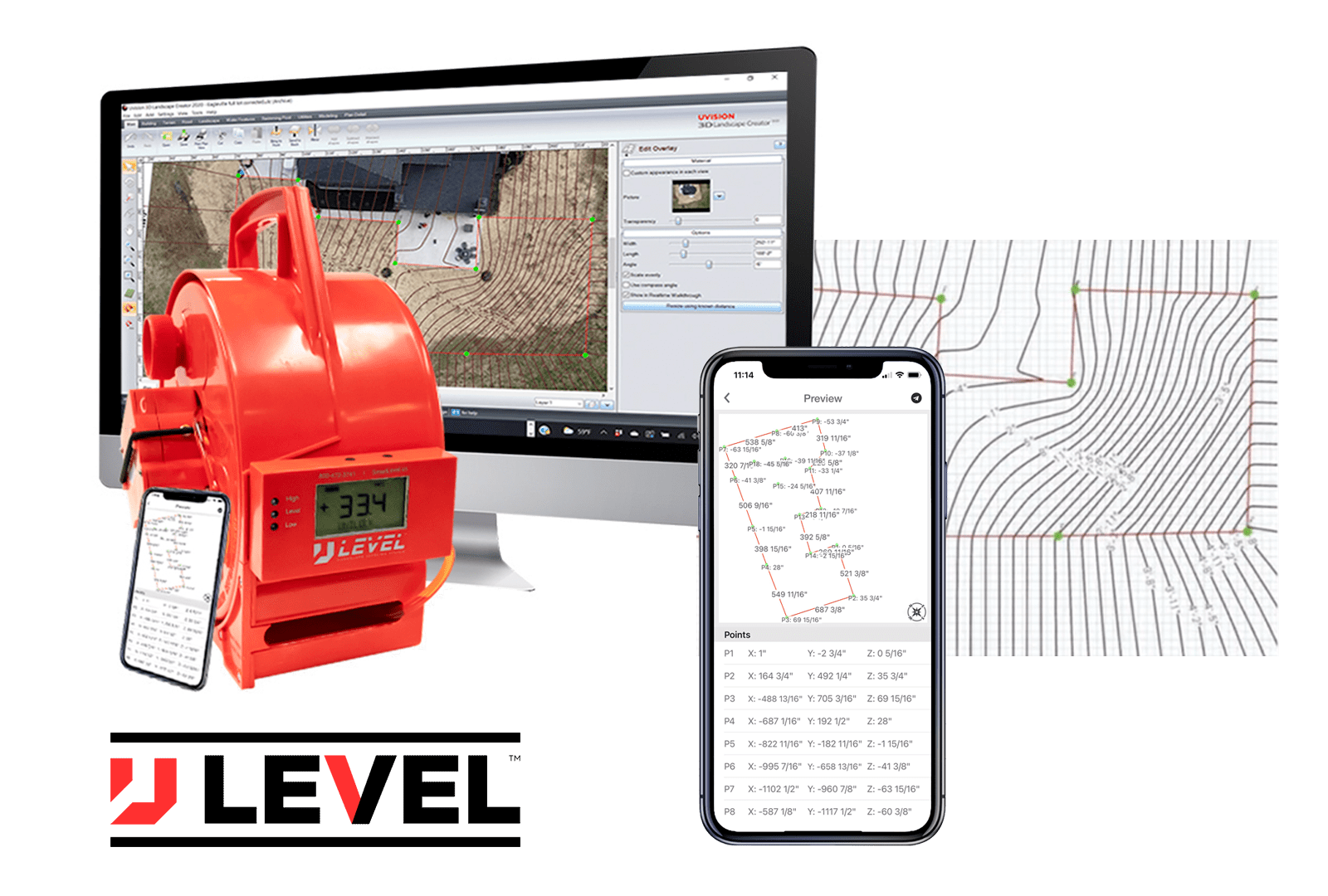
Uvision – U-Level Compatible
RECORD · UPLOAD · DESIGN
  • Precision altimeter for topography
  • When it comes to designing 3D landscapes in Uvision, U-Level is a game-changer. With U-Level, you can easily record and plot elevation changes on your smartphone via Bluetooth and seamlessly allows you to import these coordinates and elevations into Uvision 3D Landscape Creator giving you accurate grades to design by. Whether you are a novice 3D landscape designer or a pro, U-Level is an invaluable tool.
  • U-Level is also a durable site layout and construction tool too. Use it to set grades to ensure your project is constructed with the utmost in accuracy. Easily work around structures and buildings using this fluid altimeter which can even establish grades on job sites without line-of-sight.
Video Resources
Uvision 3D Tutorial: Adding Outdoor Kitchen
share-icon-svg
email-svg
See how quick and easy it is to add an outdoor kitchen in 3D with UVision....
Uvision 3D Tutorial: Modifying the Driveway
share-icon-svg
email-svg
This simple tutorial will get you up-to-speed on drawing driveways in UVision 3D Landscape Creator....
Frequently Asked Questions
What is included in the free trial?
The free trial provides full access to Uvision's complete feature set, 3D/2D design, paver/wall textures, water features, fly-through videos, photo import, SketchUp support, and exporting 2D drawings just like the purchased version.
Which operating systems and hardware are supported?
Uvision runs on Windows 10 or 11 (64‑bit). A 1 GHz CPU with 4 GB RAM (8 GB recommended), 60 GB disk space, DirectX 11 video card with 2 GB VRAM (4 GB recommended), plus mouse and keyboard, are required.
Can I import my own 3D models or photos?
Yes, Uvision software supports importing Google SketchUp models and allows you to overlay your designs on real-world photos for reference.
How do I order textures for other design tools?
You can download Unilock textures and CAD hatches compatible with other platforms like SketchUp, DynaScape, Vectorworks, and PRO Landscape via the “Software Textures and Hatches” section.
Skip to content